Getting Android games running smoothly on older hardware
What actually helps on a device a few generations behind, and what makes no difference at all.
Most performance advice for Android is folklore. These are the parts that hold up.
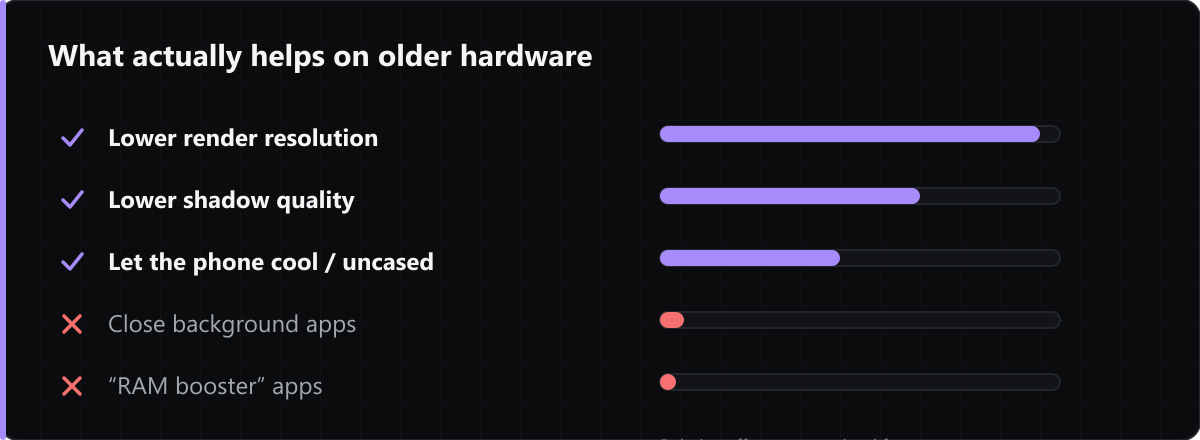
Resolution scaling beats everything else
Fragment shading cost scales with pixel count, so dropping render resolution is usually the single largest win available in a game's settings. Shadow quality is normally second.
Thermal throttling, not raw speed
Phones sustain far less than their peak clock. A game that runs well for five minutes and then stutters is throttling, not running out of power — a case that traps heat will make it worse, and charging while playing worse again.
Free RAM is not the goal
Android deliberately keeps memory occupied with cached processes. "Booster" apps that kill background processes mostly force them to be recreated, which costs more than it saves.
Check the minimum Android version first
Every listing here shows it. A build targeting a newer API level than your device runs will not install at all, which is a much simpler problem than a performance one.
Comments
Loading comments…